
Whether you plan to upgrade to the eagerly anticipated iPhone 16 or stick with a reliable older iPhone model, a high-quality and dependable virtual private network is essential.
A VPN serves as your primary shield when navigating public Wi-Fi in busy areas or conducting sensitive transactions from your mobile device. When you setup VPN on iPhone, It provides an encrypted tunnel that hides your IP address and protects your data.
I’ve tested and curated a list of the best VPN services and my recommendation for iPhone is ExpressVPN, to bolster your internet freedom and privacy. From the newest iPhone 15 Pro to the trusty iPhone 6, my recommendations cater to all models running iOS 8 or above.
Explore my complete guide and unlock the full potential of your iPhone’s security today.
How to Set Up a VPN iPhone/iPad
Follow these steps to setup VPN on iPhone:
Step 1: Open the App Store.
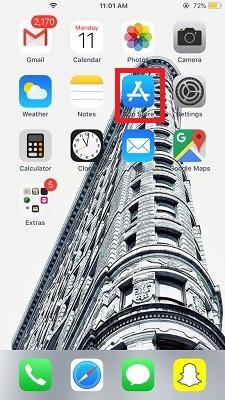
Step 2: Search for any VPN provider e.g. ExpressVPN.
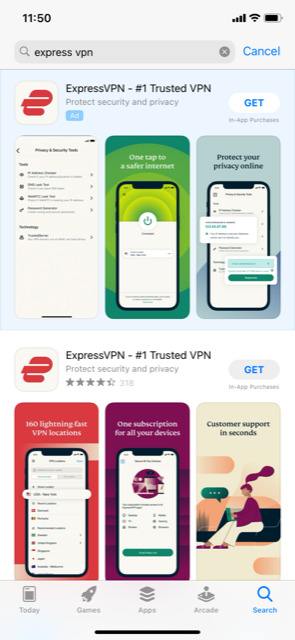
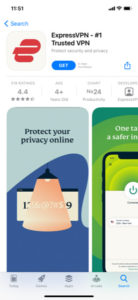
Step 3:Download and Install the VPN App
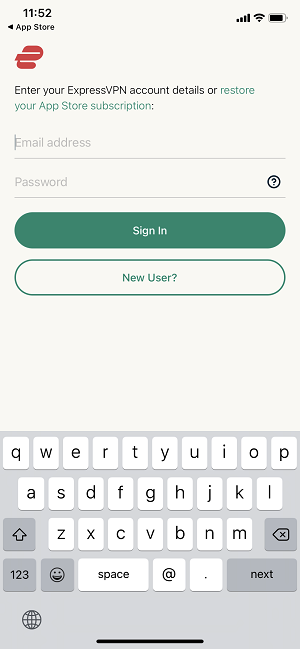
Step 4: Create an Account and sign up with your credentials into ExpressVPN.
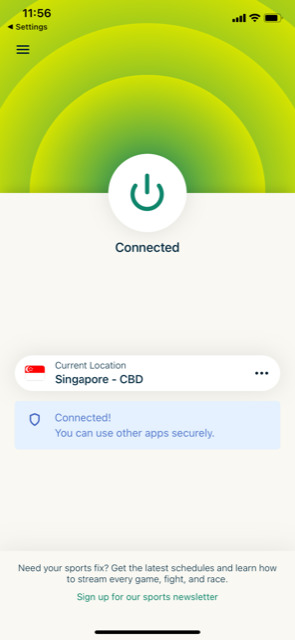
Step 5: Connect to your desired VPN server.
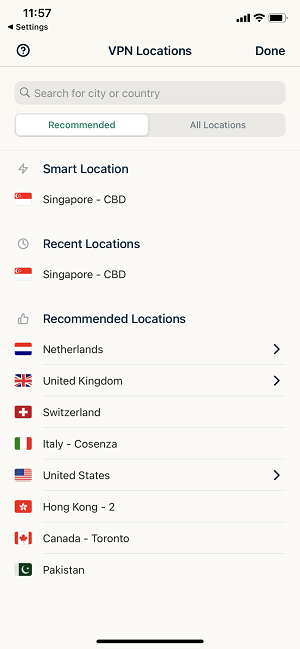
Step 6: Lastly, Verify the connection and start using a VPN!
How to Set Up a VPN on iPhone 6 or Above with an Older iOS Version
To set up a VPN on iPhone 6 or above on an older iOS version, you need to:
- Visit Safari and open ExpressVPN’s website.
- Sign in to the site with your credentials and verify your account.
- Visit your accounts page.
- Go down to iPhone and iPad. Click on ‘complete the ExpressVPN manual setup for iOS’.
- Click Allow if a prompt pops up and accept all notifications.
After this, you need to finish the VPN setup on your iPhone 6 or above. Following are the steps to do that:
- Go to the Settings of your iPhone and click General.
- Click on Profile.
- Click on your VPN.
- Click ‘Install’ present on the top-right corner.
- You will find your VPN present under the following: Settings>General>VPN.
- You can simply manage your VPN connection from there easily.
How to Manually Setup ExpressVPN on iPhone
If you need or prefer to set up the VPN manually, perhaps for a corporate VPN or if a VPN service doesn’t offer an iOS app, these are the steps to follow:
- Open the “Settings” app on your device.
- Scroll to “General” and tap on “VPN & Network” or just “VPN.”
- Tap “Add VPN Configuration” and choose a protocol like L2TP, IPSec, or IKEv2.
- Enter the server address, remote ID, account name, and authentication information provided by your VPN service.
- Save the configuration and turn on the VPN to initiate the connection.
- By manually configuring VPN settings, you’ll have more control over your connection, allowing you to select specific servers for enhanced performance and security.
How to Unsinstall VPN Configuration
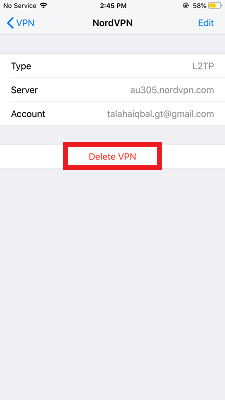
To uninstall the VPN, you just need to go follow the instructions below:
- Go to Settings
- VPN configuration page
- Click on the VPN connection name eg. ExpressVPN, you had made
- Click Delete tab
How to Choose and Use a VPN on Your iPhone
A VPN, or Virtual Private Network, establishes an encrypted tunnel for your data, hides your internet activities, and protects your iPhone VPN settings from cyber threats. This encryption makes it difficult for third parties to track your online movements or steal personal information.
When configuring a VPN on your iPhone, you’re encrypting your data and hiding your location, making it challenging for anyone to track your online activities.
When selecting a VPN provider, consider the following:
- Security: Look for a strict no-logs policy and features like a kill switch to prevent data leaks.
- Compatibility: Ensure the VPN is compatible with iOS devices and easy to configure.
- Encryption: Opt for services with strong encryption methods, such as AES-256.
- Server Locations: Providers should offer a variety of servers to help bypass geo-restrictions.
- Additional Features: Features like split tunneling and multihop connections can provide extra security.
- Ease of Use: A user-friendly interface and reliable customer service are vital.
- Free Trial: Free trials allow you to test the service before committing.
I highly suggest opting for a reliable VPN like ExpressVPN for more insights into their services; you can also read my ExpressVPN Review.
Recommended VNPs for iPhone
Using a VPN on your iPhone is a wise decision, but it’s important to note that not all VPNs are of the same quality. Some offer flawless compatibility with iOS and robust security features, whereas others might let you down when you most require their services.
Below is a quick overview of my top iPhone VPNs that I have thoroughly tested and approved:
- ExpressVPN: It is a top choice to setup VPN on iPhone due to its lightning-fast speeds and strong encryption protocols.
- Surfshark: It stands out for its unlimited device support, making it perfect for users who want to secure multiple devices with a single account.
- NordVPN: It is renowned for its large server network and advanced security features, including double VPN encryption and CyberSec technology to fend off malware.
Apple’s Newest Releases
Apple continues to impress with its innovative devices like the iPhone 15, 14 Pro, and Pro Max, introducing features such as Dynamic Island. These iPhones enhance user experience with better battery life and camera capabilities. The Apple Watch Series 8 and 9 also offer new health features and improved performance.
For iOS users, updates like iOS 16 introduce new features that improve the iPhone experience. By pairing a VPN with these devices, users can enjoy updated privacy and security features, ensuring a seamless and integrated user experience. It’s important to manage your iPhone VPN settings to maintain online privacy, and staying current with Apple’s technology can enhance your VPN experience.
Redditor’s opinion on setting up VPN on iPhone
Below are the steps provided by a user on Reddit suggesting a similar process for successfully setting up a VPN on an iPhone, as detailed in my comprehensive guide. This alignment highlights the dependability and consistency of setting up a VPN on an iPhone.
- Download and install VPN: I highly suggest opting for ExpressVPN
- Access VPN Settings: Go to ‘Settings’ > ‘General’ on your iPad. Tap on the ‘VPN’ option.
- Add Configuration: Select ‘Add VPN Configuration’. This allows multiple VPN setups if needed.
- Choose Protocol: Select your preferred encryption protocol from options like PPTP, L2TP/IPSec, or IPSec (Cisco IPSec).
- Enter Credentials: Input your VPN credentials (username, password, etc.), typically sent to your registered email. Optionally, select a recommended server that can be changed later.
- Install OpenVPN for Extra Security: For enhanced security, use the OpenVPN protocol with the OpenVPN Connect App. Download the connection setting file from your provider to connect your VPN.
As the author of this guide, I find it reassuring to see that the VPN setup steps recommended by users on Reddit align closely with those I’ve detailed. It confirms that these methods are not only effective but also widely endorsed by the tech community.
FAQ- Setup VPN on iPhone
What does a VPN do on my iPhone ?
A VPN on your iPhone encrypts all web activity, hides your device’s IP address, and replaces it with a different one. This obscures your online activities and location from ISPs, advertisers, and potential hackers, especially on public Wi-Fi networks.
Can I use a VPN on my iPhone for free?
Yes, you can use the iPhone for free; there are various VPNs available for iPhones at no cost, such as TunnelBear and Windscribe. To use them, simply download from the App Store, sign up, and connect to a server.
Are VPNs on iPhones safe?
Most VPNs for iPhones are safe, particularly if sourced from the App Store. However, ensure that the VPN does not log your activities or IP address, is based outside Five Eyes jurisdiction, and uses AES-256 encryption.
How do I choose the best VPN provider for my iPhone?
Select a VPN that is compatible with iOS and offers features you need, like speed for streaming and gaming, a no-logs policy, and strong encryption methods. Reviews, pricing, and free trials are also important factors.
Will using a VPN affect my iPhone’s speed?
Yes, While a VPN may slightly slow down your connection, however, choosing a high-speed VPN service from providers like ExpressVPN or NordVPN can minimize the impact on your iPhone’s performance.
What additional benefits does a VPN provide for my iPhone?
Apart from security and privacy, a VPN allows you to access geo-restricted content, protects sensitive communications, and can offer bundled services like antivirus or identity theft protection for comprehensive digital safety.
How do I troubleshoot VPN connection issues on my iPhone?
If you encounter issues, try switching servers, checking your internet connection, ensuring your VPN app is up-to-date, or contacting your VPN’s customer support for assistance.
The Takeaway
In conclusion, the process to setup VPN on iPhone is straightforward and enhance online privacy and security. Following the simple steps mentioned in the above guide, you can protect your internet activities from prying eyes and maintain digital freedom.
I highly recommend ExpressVPN. It’s user-friendly, extremely secure, and offers fast connection speeds, making it an ideal choice for new and seasoned VPN users.